Note Tooltip
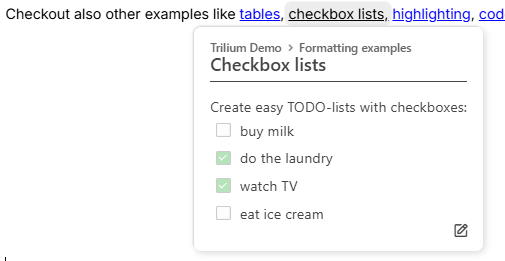
The note tooltip is a convenience feature which displays a popup when hovering over an internal link to another note.
The following information is displayed:
- The note path, at the top of the popup.
- The title of the note.
- Clicking on the title will open the note in the current tab.
- Holding Ctrl pressed while clicking the title will open in a new tab instead of the current one.
- A snippet of the content will be displayed as well.
- A button to quickly edit the note in a popup.
- For a link to blocks of the note the link is in, the Jump to block button takes its place, or Jump to heading for a heading, and scrolls to them without leaving the note.
For a link to an attachment, the tooltip shows the attachment instead: its title after the path of the note that owns it, a line giving its size (for example Attachment • 20.59 MiB), a preview of its content where one is available, and the quick edit button opening the attachment.
The tooltip can be found in multiple places, including:
- In Text notes, when hovering over Internal (reference) links .
- Collections: